The Problem
Hybrid meetings are everywhere, but they’re fundamentally broken for remote participants. When half a team is together in a conference room and the other half is on Zoom, the remote attendees become floating heads on a screen: easy to overlook, hard to interject, and cut off from the subtle social fabric that makes in-person collaboration work. Whispered asides, body language, gaze direction, the ability to tap someone’s shoulder; all of it evaporates.
This isn’t just inconvenient. It creates real asymmetries in participation, agency, and inclusion, with particular impact on people with disabilities for whom remote attendance may not be optional.
The System
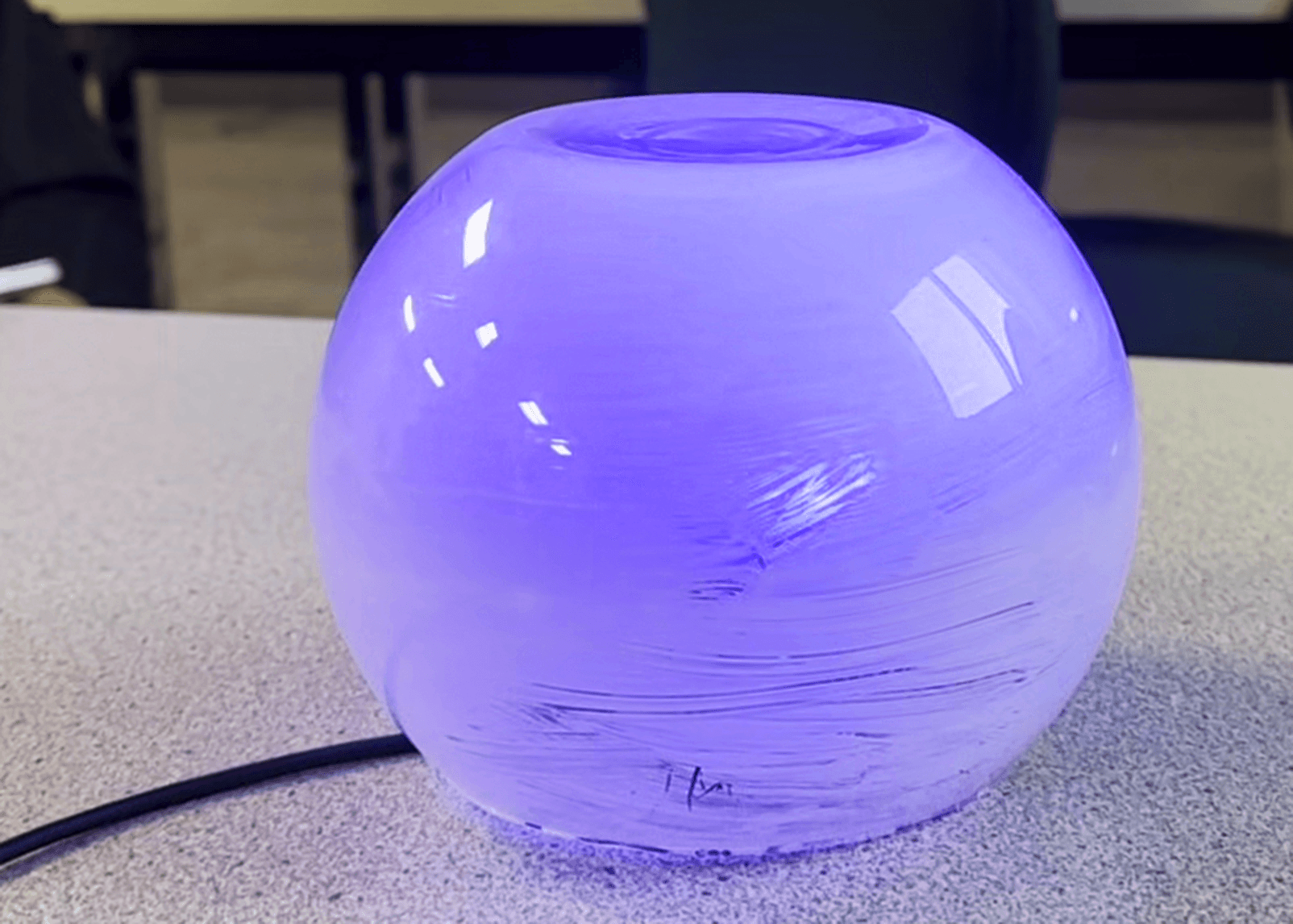
ProxyBridge rethinks remote presence from the ground up. Rather than trying to improve video tiles, the system gives each remote participant a physical embodiment in the meeting room: a translucent glass orb that sits at the table and communicates on their behalf through light, color, vibration, and spatial orientation.
The system is a three-part ecosystem:
- The ProxyBridge device: an Arduino-driven orb with a 12-segment LED ring and haptic motor, capable of 360° ambient signaling
- A native iOS companion app, mounted to the device, displaying meeting state, handling authentication, and showing the remote participant’s status
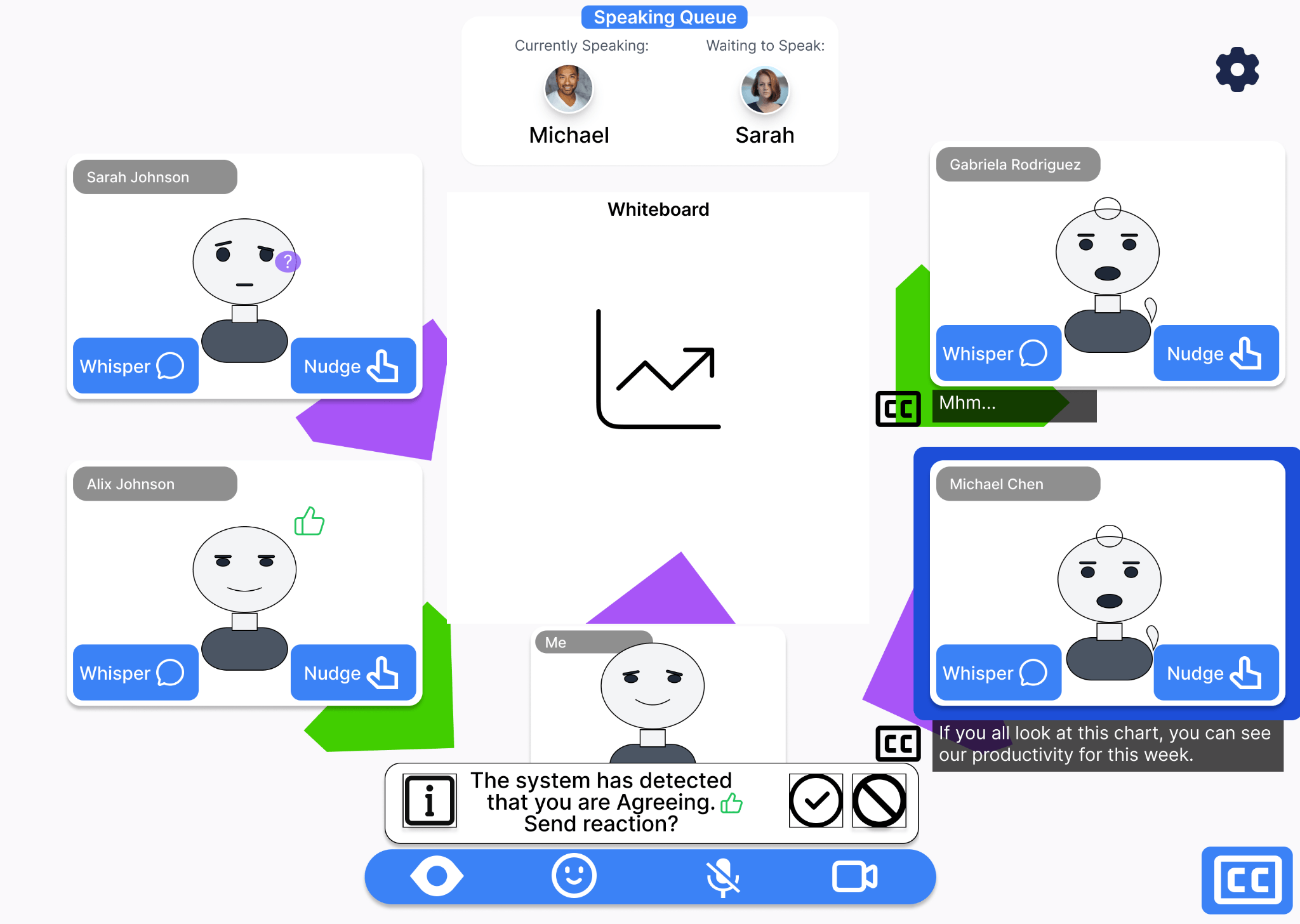
- An interactive desktop interface: the remote participant’s view, featuring spatial room mapping, whisper/nudge communication, gaze indicators, a speaking queue, and configurable privacy controls
How It Works
The orb communicates through a vocabulary of light animations, each mapped to a specific social function:
Gaze tracking: three white LEDs animate around the ring to indicate where the remote participant is looking, giving in-person attendees a sense of attention and engagement.
Speaking: a pulsing green glow signals that the remote participant is actively talking, adding visual presence to their audio.
Requesting to speak: a blue LED circles the ring like a progress indicator, then transitions into the green speaking animation. A non-disruptive way to claim a turn without verbally interrupting.
Whisper: directional purple pulses paired with haptic vibration on the side of the orb facing a specific in-person attendee, enabling the kind of private sidebar that remote participants are normally excluded from.
Nudge: a single pulse to get someone’s attention, the digital equivalent of a tap on the shoulder.
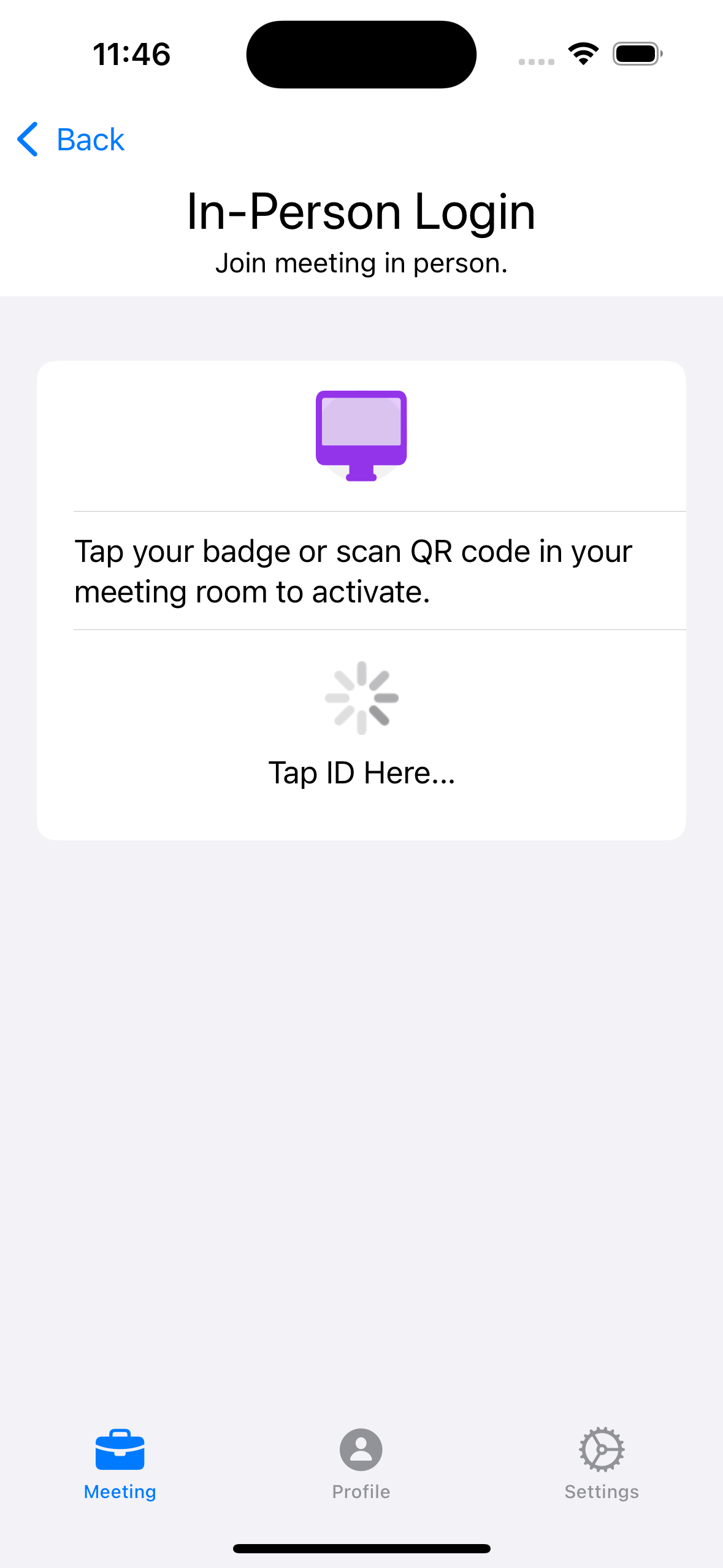
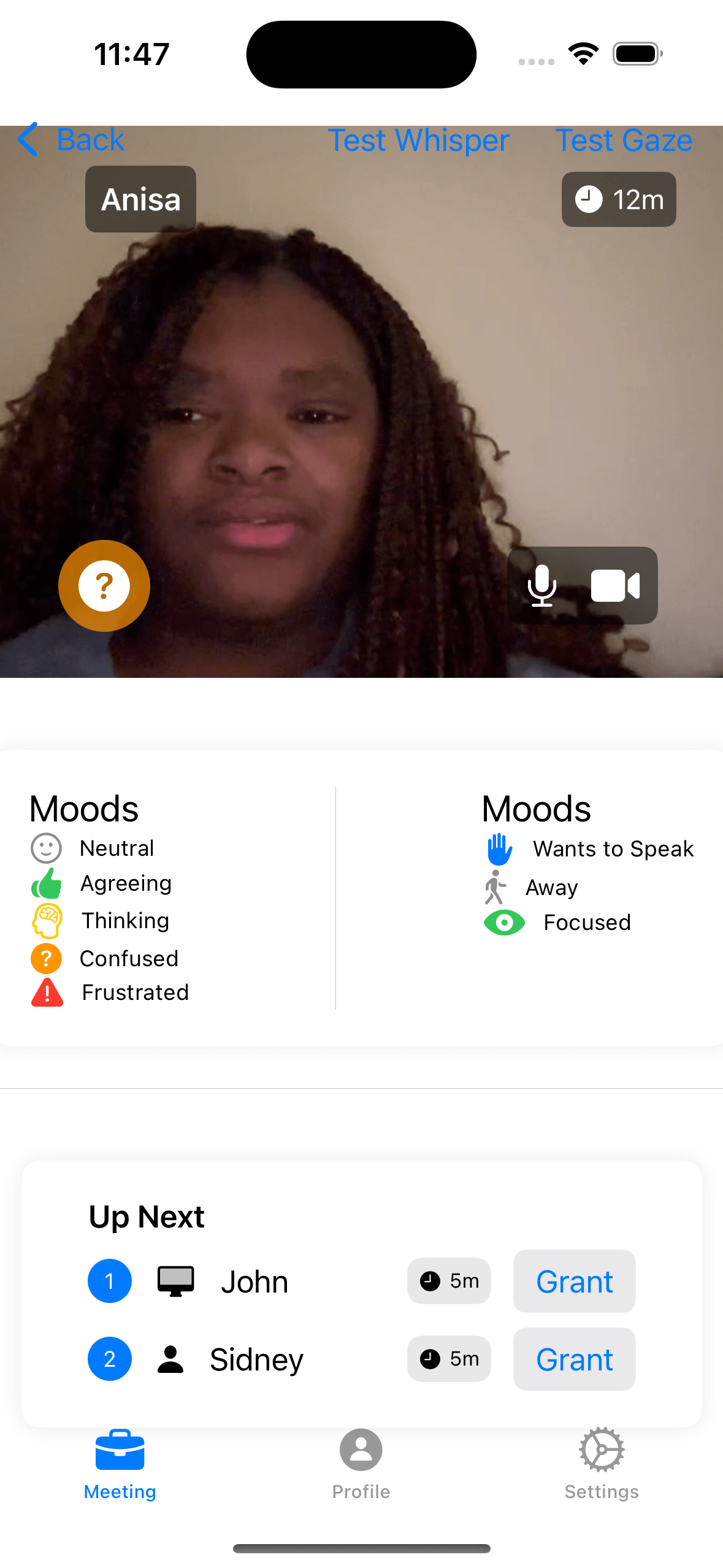
The iOS app handles device authentication (letting a remote user claim a specific orb as theirs) and displays meeting metadata like the speaking queue, participant moods, and focus levels. The desktop interface gives the remote participant spatial awareness of the physical room, along with whisper and nudge interactions targeted at specific people.
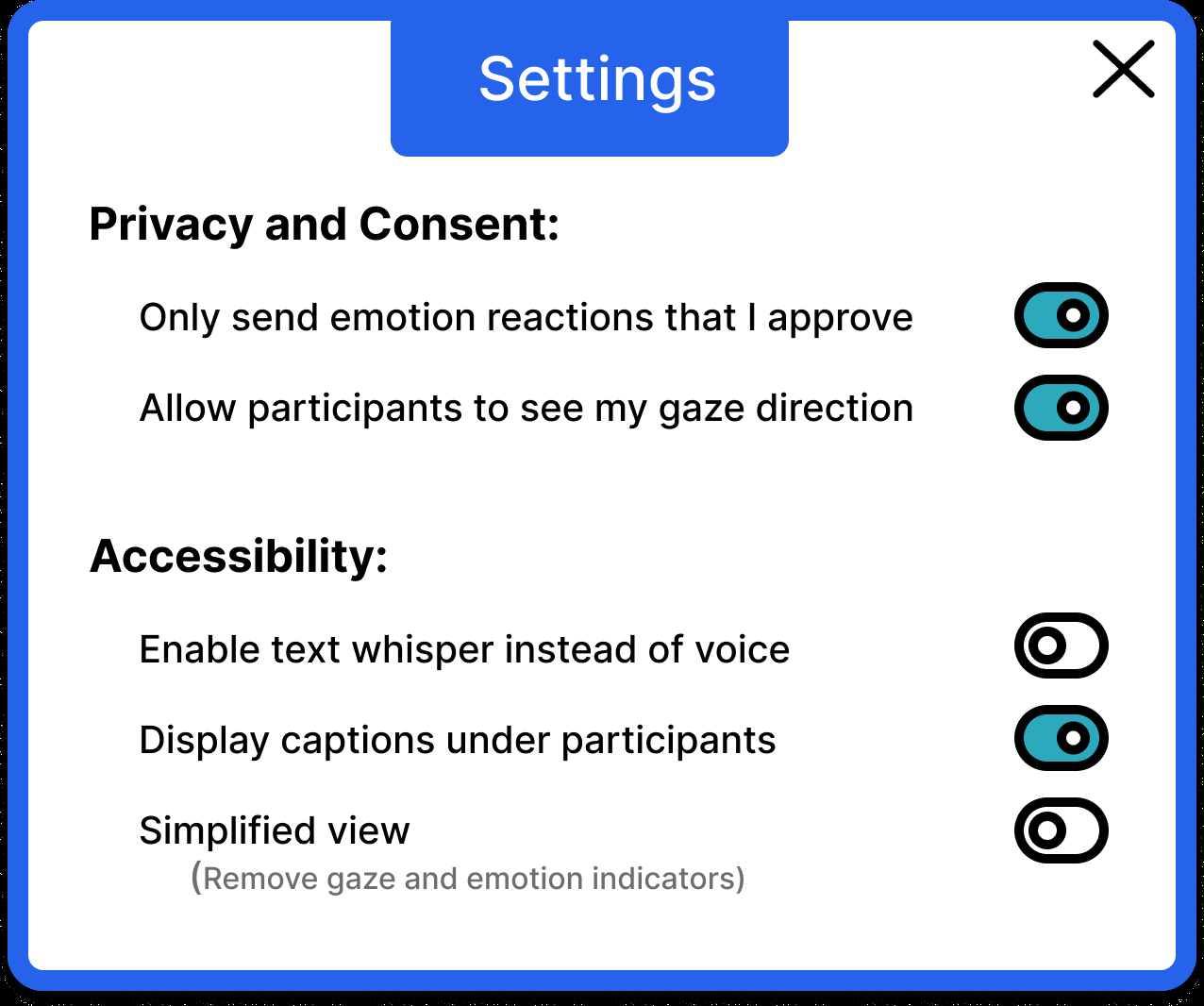
Privacy controls were central to the design. Users can independently toggle gaze sharing and emotional reactions, enable text-based whispers instead of voice, display captions under each speaker rather than at the bottom of the screen, and activate a simplified view that strips away features for reduced cognitive load.
My Role
I was the primary technical contributor on a team of four. Specifically, I:
- Built the ProxyBridge hardware prototype, designing and programming all LED animation sequences using the FastLED library in C++, integrating the haptic feedback system, and implementing the serial communication protocol for Wizard-of-Oz control
- Developed the native iOS companion app in Swift and SwiftUI
- Conducted user research, carrying out several semi-structured interviews with professionals across industries and participating in all focus group and Wizard-of-Oz usability sessions
- Drove the conceptual framing around proxemics, spatial social dynamics, and accessibility, contributing substantially to the literature review and the theoretical grounding of the project
- Co-authored the research paper, with primary responsibility for sections on proxemics, user needs, embodied device design, and significant contributions to the discussion and conclusion
Research Process
Understanding the Problem
We conducted seven semi-structured interviews with professionals across industries (senior engineers, managers, a clinical professor, a government director) to surface pain points in hybrid meetings. Recurring themes emerged: remote participants feeling invisible, missing sidebar conversations, struggling to find natural moments to speak, and discomfort with always-on video as the only channel for social presence.
An online survey (n=11) reinforced these findings. Despite all respondents rating themselves as Familiar or Very Familiar with teleconferencing tools, 8 of 11 reported feeling excluded while attending hybrid meetings remotely, suggesting the problem lies with the tools, not the users.
Prototyping and Evaluation
A focus group with HCI graduate students evaluated the initial Figma prototypes, revealing usability issues (low contrast, ambiguous iconography, unclear seat-claiming status) and important tensions around privacy. Participants valued emotional and gaze cues conceptually, but had strongly individual preferences about which information felt invasive to share.
Wizard-of-Oz usability testing of the physical prototype demonstrated that the light-based social cues successfully attracted attention and that participants felt the system meaningfully increased remote presence. Initial comprehension required some onboarding, but the interaction vocabulary became intuitive with brief exposure. Participants unanimously wanted more granular privacy controls and quieter, more discreet whisper notifications.
Key Findings
All participants agreed the device improved remote attendees’ presence in the meeting. The light-based signaling vocabulary, once understood, was considered intuitive and effective at attracting attention without being disruptive.
The accessibility implications run deep. Hybrid meetings already serve as an important accessibility tool, but remote attendance also introduces new challenges, particularly for neurodivergent individuals who may struggle with the ambiguous social cues and sustained focus demands of video calls. ProxyBridge’s simplified view and spatial captioning were designed with these needs in mind.